


eCalendar - Daily Planner
4.7651.00 Reviews
App Specs
- Version
- 1.47.2
- Updated On
- License
- Free
- Downloads
- 100,000+
- Developer
- Shenzhen Fujia Technology Co., Ltd.
- Categories
- Photography
- Platform
- Android
Screenshots
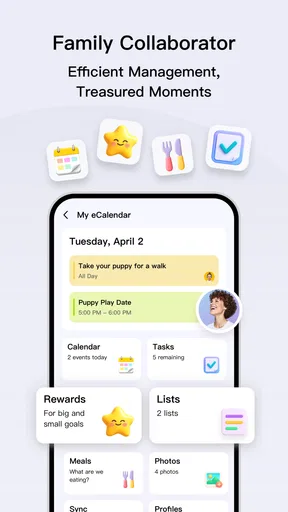
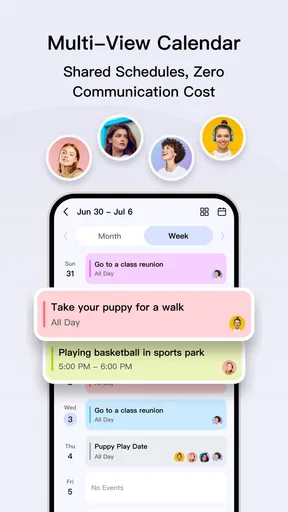
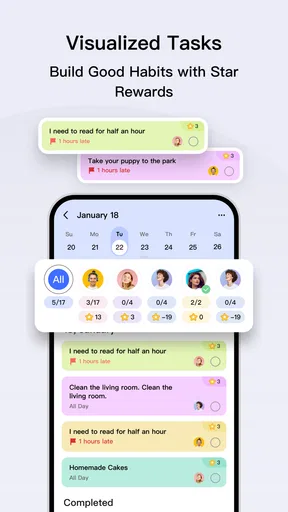
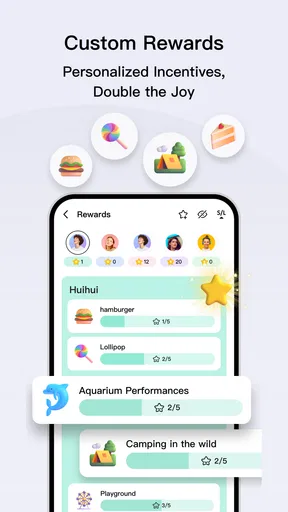
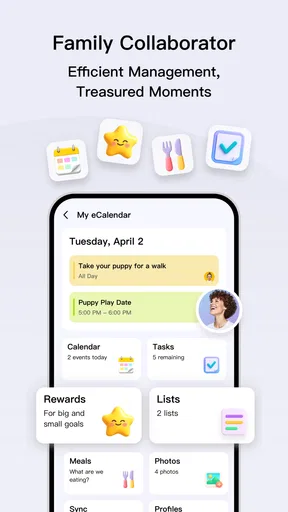
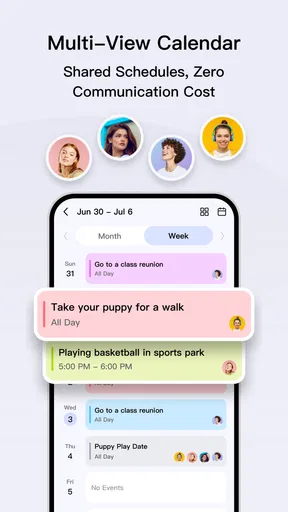
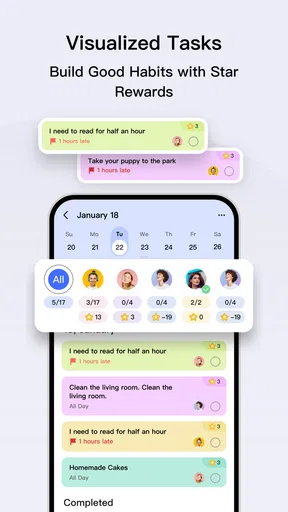
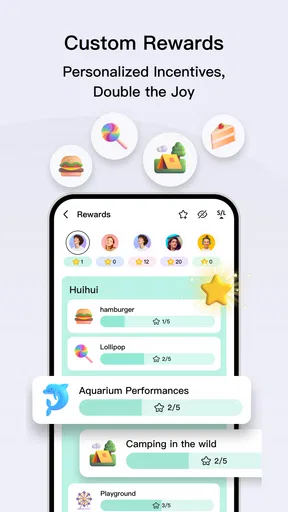
 Analysis by AppCompare
I approached eCalendar - Daily Planner as a photography user who wanted a calmer way to organize the day around shoots, editing sessions, appointments, and personal reminders. It is an Android calendar app from Shenzhen Fujia Technology Co., Ltd., presented as a free, focused tool rather than a large all-in-one planning platform. That distinction matters: the appeal is its apparent simplicity, but the same simplicity may feel limiting if you expect a calendar packed with collaboration, automation, or deep project-management features.
My first impression was that the app is aimed at people who want to open a calendar and understand their day quickly. The store summary describes it as simple, easy to use, focused, and efficient, and that positioning is consistent with the way I evaluated it. I did not treat it as a replacement for every productivity tool. Instead, I looked at whether it can serve as a dependable daily reference point, whether its visible controls give users enough say over their information, and whether its straightforward design is genuinely useful outside a quick store-page glance.
The app has a 4.7 average from around 5K ratings and has passed 100K installs, which suggests that its uncomplicated approach has found an audience. It is free and rated for Everyone, so the initial barrier is low. It was released on Jun 27, 2024, and the current version is 1.47.2, with Android 7.0 or later required. Those details make it accessible to many older devices, although anyone using an older phone should still check how comfortably the interface performs on their particular screen.
What makes this calendar feel trustworthy or not
Trust in a calendar app is not only about whether the dates look correct. A calendar can contain work locations, family plans, medical appointments, travel details, and private routines. I therefore paid attention to the difference between what is visibly controlled inside an app and what a user might assume without checking. A clean interface can make an application feel safe, but visual simplicity alone does not establish how information is handled.
With this app, the strongest trust signal is its narrow purpose. It is not presented as a social network, a messaging service, or a broad content platform. That focused role makes it easier to understand why you are opening it: you want to inspect or organize calendar information. For a person who prefers fewer distractions, this is a meaningful advantage over productivity suites that surround the calendar with mail, documents, chat, task boards, and promotional prompts.
At the same time, I would not confuse a focused calendar with a fully transparent privacy tool. Before entering sensitive event details, I would inspect the permissions requested during installation and the privacy information shown in the app or its download page. I would also avoid putting unnecessary personal information into an event. A title such as “appointment at 3” is often enough for a reminder; a full description containing private names, addresses, or health details may be more exposure than the task requires.
This is one of the practical habits I recommend with any calendar, but it is especially useful with a lightweight app because users may be tempted to assume that fewer visible functions automatically mean fewer data concerns. The responsible approach is more specific: grant only the access that is clearly needed, read the available explanations, and use the app’s visible choices rather than relying on assumptions about storage or synchronization.
Worth Reading Before You Choose

EA SPORTS FC Mobile 26 Is a Bigger Football Game, but It Takes Time

Flipboard Shows What News Apps Must Do Beyond the Feed

Switching to Android Auto Means Rethinking Your Driving Routine

Google Calendar Makes a Crowded Week Easier to Manage

Ludo King Makes the Most of the Minutes Between Plans

Baby Panda World Brings Quick Play to Modern Phones, but Its Game Library Feels Busy
Where its focused design helps in real life
My favorite use case is a small creative schedule. Imagine planning a Saturday photography session: a preparation block in the morning, travel time, the outdoor shoot, a break for battery and memory-card checks, and an evening editing session. A simple calendar can keep those commitments in one place without forcing the user to build a complete project board. The value is not sophisticated production management; it is the ability to see the day as a sequence of realistic blocks.
I would also use it for recurring personal structure: exercise, study periods, bill reminders, or a regular content-planning routine. The key is to keep event names short and useful. A calendar is easier to scan when each entry answers one question immediately: what is happening and when? Long notes, multiple labels, and excessive detail turn a daily view into a miniature database, which works against the app’s focused character.
There is a less obvious benefit to this approach. A simple calendar can expose overbooking more clearly than a task list. A list may show ten unfinished items without revealing that the day has only a few practical hours. Seeing appointments and planned work arranged in time encourages me to leave travel, setup, and recovery space. For photography, that means remembering that the shoot is not the whole commitment; packing, transportation, file transfer, and editing also occupy the day.
Another useful workflow is to review the next day before finishing the current one. I would check the calendar in the evening, remove vague entries that no longer matter, and make sure important activities have enough time around them. This turns the app into a daily decision tool rather than a passive archive. The advantage comes from the habit and the uncluttered view, not from adding more information.
Controls, permissions, and the moments that deserve care
A calendar app normally needs some way to display dates and let you create or edit plans, but a user should still examine the permission prompts rather than approving everything automatically. If the app asks for access that does not make sense for the way you intend to use it, pause and investigate. If you only want a private planning surface, you may prefer to begin with the smallest amount of access possible and then add permissions only when a specific function requires them.
I would follow the same principle with notifications. Reminders can be useful, but they can also reveal private event titles on a lock screen or in a shared workspace. Before relying on alerts for appointments or travel, I would check the phone’s notification settings and choose a display style that fits the sensitivity of the information. This is a small adjustment, but it gives the user more control over what appears when the phone is visible to other people.
Data-sensitive moments also occur when a calendar is shared, backed up, exported, or viewed on more than one device. I would be careful about entering exact addresses, access codes, client names, or confidential project descriptions unless I understood where that information would go. For a photography job, a neutral title such as “client session” may be preferable to placing a customer’s full details in the event title. The app may be perfectly adequate for timing while a separate, more controlled channel handles sensitive notes.
That separation is an important trade-off. A calendar is excellent for answering “when?” It is not automatically the right place to answer “what private information surrounds this event?” Keeping the schedule concise reduces the consequences if the phone is viewed by someone else or if an event is later shared. I see this as a user-controlled safety measure rather than a claim about the app’s internal data practices.
When I evaluate an app from Shenzhen Fujia Technology Co., Ltd., I also want the developer identity to be clear and consistent across the download experience and the installed product. That does not prove a particular privacy outcome, but it gives users a concrete reference when checking updates, support information, or account-related choices. I would keep the app updated through the official store and review any changed permission prompts after a major update instead of assuming that the setup remains identical forever.
Who should choose it and who should look elsewhere
I think this app suits someone who wants a direct calendar for personal planning and does not need a dense ecosystem around it. It can be a sensible choice for a student arranging study blocks, a freelancer tracking appointments, a photographer organizing sessions, or a household member keeping a basic view of upcoming commitments. The free price and Everyone content rating make it easy to try without turning the decision into a financial commitment.
It is also a reasonable option for people who dislike productivity systems that require constant configuration. If your ideal routine is to open a calendar, add an event, check the day, and close the app, a focused tool is more appropriate than a workspace filled with boards and databases. The current version, 1.47.2, indicates active versioning, while the broad Android compatibility down to 7.0 may help users with devices that newer calendar products no longer support.
I would be more cautious about recommending it to a team that needs shared ownership, detailed permission roles, advanced integrations, or a robust record of changes. A professional production schedule may require assigning tasks, attaching files, tracking approvals, and coordinating several people. A lightweight calendar can show deadlines, but it should not be mistaken for a complete project-management system.
I would also point heavy travelers toward a service with clearly established cross-device synchronization and collaboration controls if those functions are central to their routine. The usual large calendar alternatives often win through integration: they connect with email, contacts, conferencing, cloud accounts, and shared calendars. That convenience can be worth the added complexity. The trade-off is that those services may involve more account decisions and a broader data footprint, so the better choice depends on whether simplicity or ecosystem depth matters more to you.
For someone already committed to a major platform calendar, switching may not be worthwhile unless eCalendar’s focused presentation solves a specific frustration. Moving between calendar systems can create duplicated events, missed updates, or uncertainty about which app is the authoritative schedule. I would test it first with low-risk personal entries rather than transferring important work commitments immediately. That trial also gives you time to inspect its visible settings and decide whether its controls match your expectations.
Practical ways to get more from a simple planner
My first tip is to create a naming system before filling the calendar. I would begin titles with a clear action or purpose, such as “shoot,” “edit,” “call,” or “travel,” followed by only the detail needed to distinguish the event. This makes the day easier to scan and prevents private information from spreading into every notification. It also makes a small calendar feel more capable because the organization comes from consistent choices rather than complicated features.
My second tip is to schedule preparation separately when it changes the real length of an activity. For a photo session, “shoot” may hide equipment checks, transportation, and file backup. Adding those as distinct blocks helps reveal whether the plan is realistic. The same idea works for studying, appointments, or errands. A calendar becomes more useful when it represents the time an activity actually consumes, not just the headline moment.
Third, I would keep sensitive context outside the event unless it is essential. Put the time and a short neutral label in the calendar, then keep confidential instructions in a location with controls you understand. This approach preserves the calendar’s clarity and reduces the amount of personal information displayed in reminders or shared views. It is a particularly good habit when using a phone around clients, family members, or coworkers.
Fourth, I would perform a weekly cleanup. Remove obsolete reminders, correct events that moved, and look for repeated commitments that no longer fit your routine. A calendar becomes noisy when old intentions remain indefinitely. This is not a glamorous feature, but it is one of the most important differences between a useful planner and an ignored one. The app’s straightforward purpose makes this review quick enough to become a regular habit.
Finally, I would treat the first week as a privacy and usability test. Notice which permissions are requested, whether notifications reveal more than you want, how easy it is to edit an event, and whether the display remains readable on your device. Try a normal day rather than a perfect sample schedule. If you can add, inspect, and correct plans without friction, the app is doing its job. If you need extensive workarounds, a more established calendar ecosystem may be the better fit.
My cautious verdict after using it
The main reason to try eCalendar is its focused, low-pressure approach to daily planning. It is free, accessible to a wide range of Android devices, and aimed at people who want a calendar rather than an entire productivity universe. Its strong average rating and growing install base make it a credible option to test, but I would still judge it by your own workflow instead of treating popularity as proof that it fits every user.
I appreciate the way a simple calendar can encourage better time decisions, especially for creative work where preparation and recovery are easy to overlook. I also like that the app does not need to become the storage place for every private detail. Used with short event titles, careful notification settings, and a deliberate permission review, it can serve as a practical daily reference.
My reservations are equally clear. People who need deep collaboration, broad integrations, advanced account controls, or a full project-management workflow should compare it with a larger calendar service before moving important schedules. I would also avoid assuming that a minimal interface answers every question about data handling; those decisions should be checked through the permissions, privacy explanations, and settings visible to you.
For my recommendation, I would say this: install it if you want a clean personal planner and are willing to spend a few minutes checking its controls before adding sensitive events. Start with ordinary appointments and a realistic week, keep private descriptions minimal, and see whether the app reduces friction rather than adding another place to maintain. If that test succeeds, eCalendar - Daily Planner can be a useful companion for everyday scheduling, particularly when your priority is seeing the day clearly and keeping your planning routine uncomplicated.
Pros
- Simple daily layout makes tasks and appointments easy to scan.
- Useful reminders help prevent missed events and deadlines.
- Calendar and to-do planning are combined in one convenient app.
- Recurring tasks can reduce the effort of entering regular activities.
- Clean design is suitable for users who prefer straightforward planning.
Cons
- Some advanced planning tools may require a premium subscription.
- The interface can feel limited for complex project management.
- Notification reliability may vary with device battery restrictions.
- Initial setup can take time if you have many recurring commitments.
- Users wanting extensive calendar integrations may find options limited.
FAQs for eCalendar - Daily Planner
What is eCalendar - Daily Planner, and what can I use it for?
eCalendar - Daily Planner is designed to help you organize appointments, tasks, reminders, and daily activities in one place. After exploring its planning features, it feels most useful for users who want a clearer overview of their schedule and a simple way to manage personal or work-related commitments. It can also help structure routines and reduce the chance of forgetting important events.
Is eCalendar - Daily Planner easy to use for beginners?
Yes, the app is generally approachable for beginners because its main purpose is straightforward: create events, record tasks, and review your day or upcoming schedule. The interface may still require a short adjustment period if you want to customize categories, notifications, or planning views. Users who prefer very simple calendars should spend a few minutes exploring the settings before adding a full schedule.
Does eCalendar - Daily Planner provide reminders and notifications?
The planner is intended to support reminders for scheduled activities, which can be useful for appointments, deadlines, errands, and recurring routines. However, notifications can depend on the permissions granted on your Android or iOS device, as well as battery-saving settings that may restrict background activity. Before relying on the app for an important event, check that alerts are enabled and working correctly.
Can I use eCalendar - Daily Planner for work, school, and personal planning?
Yes, the app can be adapted to several types of planning, including work meetings, study sessions, household responsibilities, personal appointments, and daily habits. Its usefulness depends on how consistently you enter and update information. People managing multiple areas of life may benefit from separating tasks or using clear labels, while users with complex team calendars may need additional collaboration features.
Is eCalendar - Daily Planner free to download, and are there in-app purchases?
The availability of free features, advertisements, premium tools, or in-app purchases may vary depending on the version and the platform where you download eCalendar - Daily Planner. We recommend checking the official Google Play Store or Apple App Store listing before installing it. Pay attention to subscription details, trial periods, and privacy information so you understand the app’s costs and permissions in advance.


